

Can a 100W Power Bank Run a Starlink Mini?
A 100W power bank is a candidate for running a Starlink Mini if one USB-C Power Delivery output supplies 20V at 5A and you use Starlink’s Mini USB-C to barrel-jack cable. Check the output table before buying. A bank that reaches 100W only across two ports falls short of the cable’s single-connection requirement. Then work out how long you need the connection. A 90Wh bank can be worth evaluating for a short stop, while a larger battery makes more sense for a long work session away from an outlet. The power rating tells you whether the source meets the cable specification. The energy rating helps you plan how long it might last. Starlink Mini specifications
Match the cable to one USB-C output
Starlink’s Mini has a barrel-jack power input. Its separately sold Mini USB-C cable connects that input to a USB-C PD source. The accessory guide specifies 100W at 20V and 5A. Read the output figures for the individual connection you intend to use. A 65W port can supply less than the cable calls for even if the dish’s average draw looks much lower. A power bank’s 100W input rating tells you how fast the bank can recharge under suitable conditions. Look in the output section for the figure that matters here. Starlink Mini accessories guide
The iFORWAY PB02 lists 20V/5A from one USB-C output, including its USB-C socket, and 90Wh of rated stored energy. That makes it a reasonable option to evaluate if you need short off-grid sessions with Starlink’s official cable. Start by connecting the Mini’s cable directly to the power bank’s USB-C socket and leave the other outputs free. The published profiles match on paper. Confirm that your own setup starts and stays online before you depend on it. View the iFORWAY PB02 output specifications
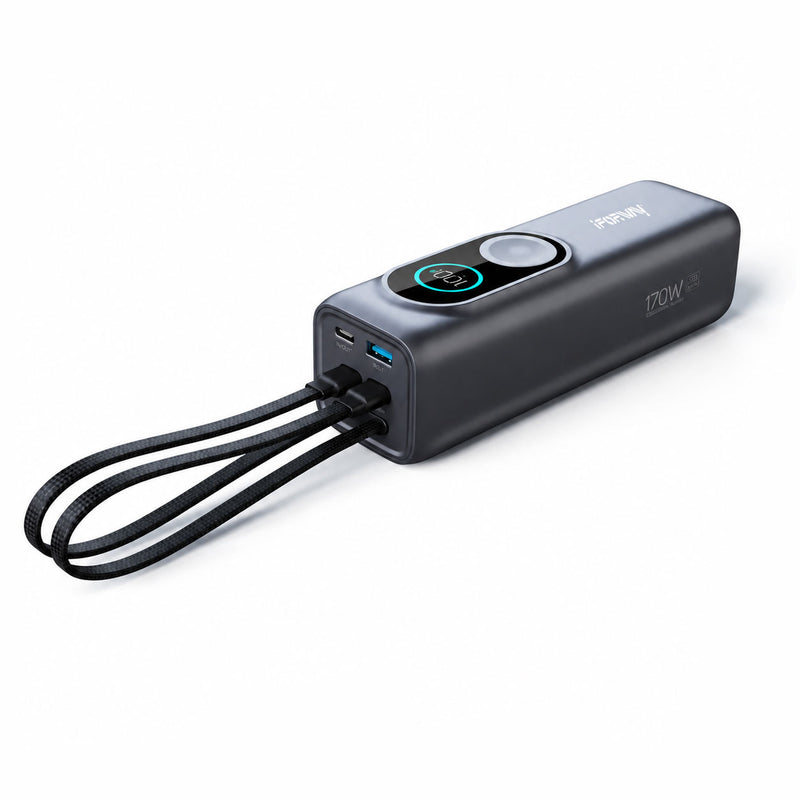
iFORWAY 25,000mAh 170W Laptop Power Bank
$129.69
High-capacity portable charging for laptops, phones, and more. Features up to 170W total output, dual built-in USB-C cables, Apple Watch wireless charging, and an easy-to-read display for power on the go.
| What you already have | What to do |
|---|---|
| A power bank with 20V/5A from one USB-C output | Try that output with Starlink’s Mini USB-C cable before replacing the bank. |
| A phone bank with 65W on its strongest port or 100W shared across several ports | Choose a source with 20V/5A on one output if you want to use the official USB-C cable. |
| A working wall outlet where you will set up | Use the included Starlink power supply and cable. |
| A vehicle supply at your usual stop | Compare Starlink’s Mini Car Adapter with carrying and recharging a separate battery. |

Size the battery for the time you need online
Starlink’s Mini specifications list average consumption of 25–40W. Use that as a reference for planning, then budget for the conditions where you will actually connect. The 100W USB-C source requirement is separate from the average draw you use to estimate energy. Starlink Mini specifications
Planning estimate = rated battery energy in Wh × assumed usable fraction ÷ assumed average load in W.
For illustration, assume a full 90Wh battery, 80% of its rated energy available at the load after losses and reserve, and no other connected devices. That gives 72Wh to plan with. The 80% figure is a modeling assumption. The table shows calculated scenarios for this setup.
| Assumed average draw | Estimated time from 72Wh |
|---|---|
| 25W | About 2 hours 53 minutes |
| 30W | About 2 hours 24 minutes |
| 40W | About 1 hour 48 minutes |
These estimates can shift with temperature, activity, starting charge and actual conversion losses. Leave a buffer for setup and unexpected delays. For example, three hours at an average of 40W takes 120Wh at the load. With the same 80% assumption, that calls for at least 150Wh of rated battery energy before you add a buffer. For that job, compare a larger portable power station and check its output against the power connection you plan to use. iFORWAY guide to power banks and portable power stations
iFORWAY 25,000mAh 170W Laptop Power Bank
$129.69
High-capacity portable charging for laptops, phones, and more. Features up to 170W total output, dual built-in USB-C cables, Apple Watch wireless charging, and an easy-to-read display for power on the go.
Budget for time online, including setup
If your stop lasts two hours but the Mini only needs to be online for a 45-minute upload, work from the time the dish will actually be powered, including startup and any time you spend waiting for the transfer to finish. If you need the connection to stay up between tasks, count those gaps too. Write down the longest session you expect, compare it with the conservative end of the estimate, and decide how much reserve you want. That gives you a better reason to carry a bigger battery than the number of watts printed on the box.
Check the setup before relying on it
First confirm the Mini works with the included Starlink supply. Then switch to the official USB-C cable and a fully charged bank, with no phone or laptop attached. Use the connection under a workload that resembles your planned session and observe whether it stays online. If you also need to charge a laptop, check the bank’s output allocation for that exact combination before plugging it in. Reserving the bank for the Mini is the simpler choice when connectivity matters more than topping up a second device.
Can I use the USB-C cable that comes with my laptop?
Use Starlink’s Mini USB-C to barrel-jack accessory for this setup. A USB-C to USB-C laptop cable cannot connect to the Mini’s barrel-jack input. Starlink Mini accessories guide
Can I apply the same recommendation to a Starlink Standard kit?
Check the spec sheet for your exact kit. The cable and power ratings discussed here apply to Starlink Mini. Starlink power requirements by kit
If your usual stop is short and the 90Wh energy budget leaves enough margin, check the iFORWAY PB02 for your Starlink Mini setup.
0 comments